
SEO Audit Checklist: 90+ Checks to Run First
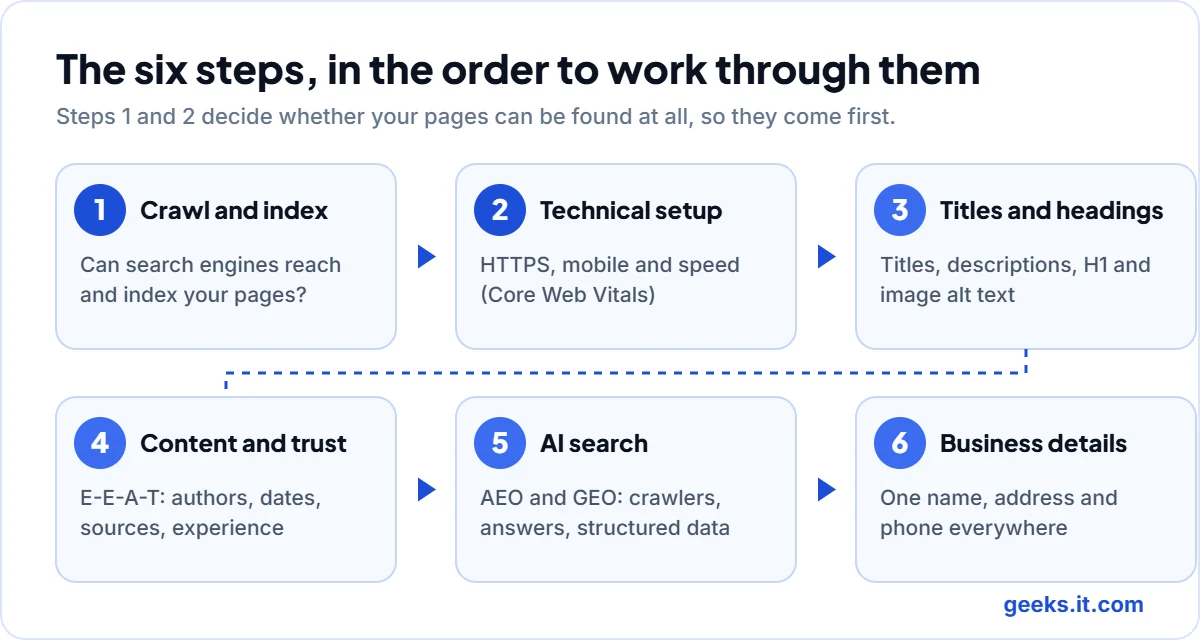
An SEO audit checklist is a list of the things worth checking on a website, in an order that stops you wasting time. Used properly, it tells you why pages are not showing up on Google, why visitors leave, and which problem to fix first. This SEO audit checklist follows the checks in our own free audit, grouped into six steps that run from crawling and indexing through to how AI assistants read your pages.
We should start with a warning. Most audits go wrong because people run every check at once and then fix whatever looks easiest. A broken footer link feels like progress, and it rarely is. If Google cannot index your service pages, nothing further down the list matters yet, so read the steps in order and treat the SEO audit checklist as a map, not a pile of chores.
What is an SEO audit checklist, and who needs one?
An SEO audit checklist is a repeatable set of checks covering crawling, technical setup, on-page SEO, content quality and AI search readiness. Any site that depends on organic traffic needs one, especially after a redesign, a platform change or a sudden drop in visitors.
You do not have to be technical. If you run a small business website on WordPress, you can do most of it with a browser and a free Google Search Console account. We flag the parts that need a developer as we go.
How do you use this SEO audit checklist?
Work from the top. Steps one and two decide whether search engines can find and load your pages at all, so they come before anything about wording. Steps three to five are where most visible gains come from.
Keep a plain spreadsheet beside the SEO audit checklist with three columns: the page, the problem, and who will fix it. By the end you will have a priority list instead of a vague feeling that the site is “not great”.
You will want some data. Search Console is free and shows how Google sees the site. A crawler saves hours, because it visits every page and reports patterns you would never spot by clicking around. Our free SEO audit does this for your homepage and up to 25 pages, and how our free SEO audit works explains what it checks and where the numbers come from.
Step 1: Can search engines crawl and index your pages?
This is the step people skip, and it hurts most when it goes wrong. A page that search engines cannot fetch, or have been told to ignore, has no chance of ranking, however good the writing is.
Start with your robots.txt file, which you can read at yourdomain.com/robots.txt. Make sure it is not blocking folders that hold real content. One detail catches people out: a Disallow rule stops crawling, not indexing, so a blocked page can still appear in results as a bare address. Our robots.txt and sitemap checker reads the file and flags the usual mistakes.
Next, look for stray noindex tags. They are often left over from a staging site and turn up on live pages more than anyone likes to admit. Then work through this short list:
- Your XML sitemap lists only pages that return a normal 200 response and that you want indexed, and it is submitted in Search Console.
- Each page has a canonical tag pointing to itself, unless it really is a duplicate.
- Broken pages, redirect chains and soft 404s are fixed or removed.
- Every important page is reachable by a normal link. Pages with no internal links pointing to them are called orphans, and they are easy to forget.
Finally, open the Pages report in Search Console and read the reasons given for pages that are not indexed. “Crawled, currently not indexed” usually points to thin or repetitive content.
Step 2: Is the technical setup sound?
Technical problems rarely feel urgent, which is why they sit unfixed for years. This part of the SEO audit checklist is quicker than it looks.
Check that the whole site loads over HTTPS and that only one version of your address works. If both the www and non-www versions load without redirecting, you are splitting signals between two copies of the same site.
Check the mobile version, because Google indexes that one first. Look for a proper viewport tag, readable text and buttons that are easy to tap.
Then look at speed. According to Google’s web.dev documentation, a page is good when Largest Contentful Paint is 2.5 seconds or less, Interaction to Next Paint is 200 milliseconds or less, and Cumulative Layout Shift is 0.1 or less, measured at the 75th percentile of visits. Search Console shows these numbers for your own visitors, which is more honest than any single lab test. Slow sites are usually held back by the same few things: no page caching, oversized images and too many plugins.
Step 3: Are titles, descriptions and headings doing their job?
This is where the SEO audit checklist gives you quick wins, because you control every word.
Each page needs its own title that says what the page is about, ideally in about 50 to 60 characters so it is not cut off. Put the main phrase near the start and write it for a person. Duplicate titles across many pages usually mean a template is doing the work instead of a writer.
Meta descriptions are not a ranking factor, but they shape whether someone clicks. Aim for roughly 120 to 160 characters and expect Google to rewrite them sometimes. Our meta tag checker shows both exactly as you wrote them.
Give each page one clear H1. Google has said that more than one H1 will not hurt your rankings, so this is not an emergency, but a single main heading is kinder to readers and screen readers. Last, give every meaningful image a short, honest alt text, and rename files from IMG_4021 to something a person could understand.
Step 4: Is the content helpful, and can people trust it?
Here we look at E-E-A-T, which stands for experience, expertise, authoritativeness and trust. Google’s own guidance on creating helpful, reliable, people-first content is careful to say that these are not a single ranking factor, and that trust matters most of the four. The job is not to chase a number but to show visitors that a real, qualified person is behind each page.
Check each important page for these signs:
- A named author with a short bio that links somewhere real, such as an About page or a professional profile.
- A visible date, and an update when the facts change.
- Claims backed by sources that you link to.
- First-hand experience: your own process, photos and examples, not a rewrite of what everyone else says.
- If AI helped to draft anything, a person has checked it and you say so where it matters.
Google’s own questions make a handy test. It asks who created the content, how it was created, and why. If you cannot answer all three in a sentence each, the page needs work. Our About page shows how we answer the first one.
Be honest about thin pages too. A page with a hundred words and a stock photo helps nobody, and a site full of them can look made to rank rather than to help. Merge them into one stronger page or improve them properly.
Step 5: Can AI assistants read and cite your site?
This is the newest part of any SEO audit checklist and where we see the most confusion. People call it AEO (answer engine optimization) or GEO (generative engine optimization). Both come down to making your pages easy for a machine to understand and worth quoting.
Start with access. AI search tools use their own crawlers, such as OAI-SearchBot, PerplexityBot and Claude-SearchBot. Some sites block them by accident with an overly broad robots.txt rule. Blocking training crawlers such as GPTBot is a separate decision from blocking the bots that fetch pages to answer a live question. Our AI crawler checker shows which ones your robots.txt allows.
Then look at how your pages are written. Assistants lift answers from pages that give one directly, so put a short, plain answer under a question-style heading and add the detail afterwards. Use lists and tables where the information really is a list or a table.
Add structured data where it fits. Organization markup says who you are, and Article markup says who wrote a piece and when. Our schema markup generator builds valid JSON-LD you can paste in.
Then there is llms.txt, an optional file that lists your most important pages in a form AI tools can read. It is a new convention and not a ranking signal, and no one can promise it will change how an assistant describes you. If you want to try one, our llms.txt generator will draft it for you, but think of it as tidying up and not a growth plan.
Step 6: Are your business details consistent everywhere?
Use one name, one description and the same address and phone number on your site, your Google Business Profile and any directories. Small differences like “Road” and “Rd” are not fatal, but real contradictions make machines guess or skip you. Make sure your About and Contact pages exist and say something useful.
How do you prioritise what you find?
You will end up with a long list from the SEO audit checklist, and it is tempting to start at the top. Don’t. Sort by how much each problem stops people from finding the site, then by how many pages it touches.
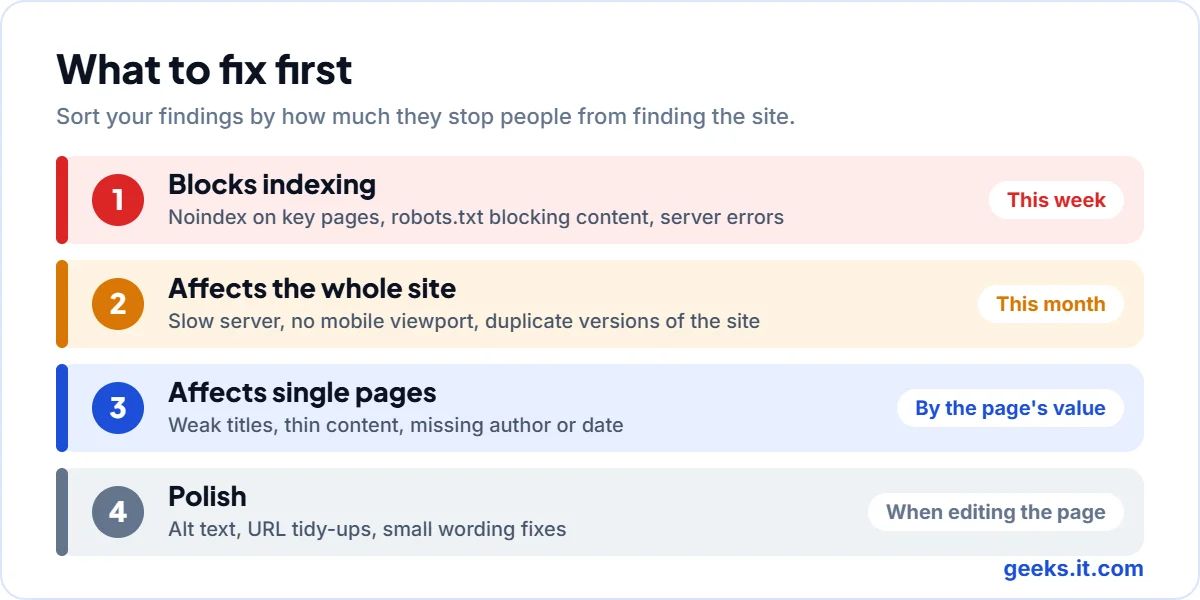
| Priority | What it looks like | When to fix it |
|---|---|---|
| 1. Blocks indexing | Noindex on key pages, robots.txt blocking content, server errors | This week |
| 2. Affects the whole site | Slow server, no mobile viewport, duplicate versions of the site | This month |
| 3. Affects single pages | Weak titles, thin content, missing author or date | By the page’s value |
| 4. Polish | Alt text, URL tidy-ups, small wording fixes | When editing the page |
Within each group, do the cheap fixes first. Changing a title takes five minutes, while rebuilding a template takes a week. After a batch of fixes, run the SEO audit checklist again. It is the only reliable way to confirm the change worked and that you did not break something else.
What an audit cannot tell you
An SEO audit checklist finds problems. It does not decide what your business should say or whether your offer is any good, and it cannot promise a ranking, because results depend on competition. Our content checks are heuristics that flag pages worth a human look, so a person still has to judge whether the page is actually good. Response times are measured from our server, so confirm them with real-user data in Search Console.
Questions people ask
How often should you run an SEO audit checklist?
For an active site, once a quarter is a sensible rhythm. Run it again after anything big, such as a redesign or a drop in traffic you cannot explain.
How long does an SEO audit take?
A small business site can be checked in a couple of hours with a crawler and Search Console. Fixing what you find usually takes much longer than finding it.
Can you do an SEO audit for free?
Yes. Google Search Console, your browser and a free audit tool cover most of it. Ours gives you a scored report with a ranked fix list.
Do you need a developer to fix what you find?
Often not. Titles, descriptions, content and internal links are editorial jobs. Indexing rules, speed work and template problems are where a developer helps.
If you would like the SEO audit checklist run for you, run the free SEO audit and start with the highest priority items. If you want help fixing what it finds, our SEO services page explains how we work.